
Affiliate disclosure: This article contains affiliate links. We may earn a commission if you sign up through them, at no extra cost to you.
Netlify has become one of the services I reach for when I want to move a web project from local files to a working public URL without turning deployment into a separate project. I use Netlify for several of my own web projects, and I have been very satisfied with how straightforward the deployment workflow has been.
That does not mean every Netlify feature is necessary for every site. This Netlify review looks at the practical workflow, the increasingly important AI-assisted options, the current credit-based pricing, and the trade-offs you should understand before choosing it in 2026.
Quick Verdict
Netlify is an approachable deployment platform with enough depth to support much more than a basic static site. Its strongest qualities are the short path from code to a live URL, useful previews for changes, Git-based continuous deployment, and a broad set of platform services. Netlify Drop is especially friendly for a first deployment, while developers can grow into build configuration, Functions, Forms, domains, and automated workflows.
The main caution in 2026 is pricing visibility. The new plans combine several kinds of usage into credits. That is simpler than tracking many separate quotas, but you still need to understand what consumes credits and what happens when your allowance is exhausted.
What Is Netlify?
Netlify is a platform for building, deploying, and operating modern websites and web applications. You can connect a Git repository, upload a project directly, use an API or command-line workflow, or begin with an AI-assisted workflow. Netlify then builds the project when required and distributes the deploy through its global delivery network.
The appeal is that deployment, previews, domains, HTTPS, and optional backend capabilities can live in one place. You can use Netlify for a plain HTML site, a framework-based front end, or an application that also needs serverless logic and form handling. It supports many frameworks rather than locking the workflow to a single one.
Why I Use Netlify for My Web Projects
My positive experience starts with the basic workflow: I can focus on the site, define how it should build, and let Netlify handle the deployment process. A successful deploy produces a specific version of the site, and the dashboard makes the result easy to inspect. That clear boundary between building and publishing is useful when I am moving quickly.
I also like that the platform offers an easy entry point without removing the more structured route. A small local project can begin with a drag-and-drop deploy. A project that needs repeatable releases can connect to Git and use previews. The workflow can become more capable without forcing every beginner to configure all of it on day one.
How Netlify Deployment Works
For a Git-connected project, Netlify watches the linked repository. When you push an eligible change, it runs the configured build command and publishes the files from the publish directory. Common frameworks may be detected automatically, but you can control the build command, base directory, package directory, environment variables, and deploy contexts.
This model is convenient because the repository remains the source of truth. A failed build does not silently replace the working production deploy, and logs help you investigate configuration or dependency problems. Teams can also keep important configuration in a netlify.toml file so changes are versioned alongside the project.

Netlify Drop: The Simplest Way to Publish a Site
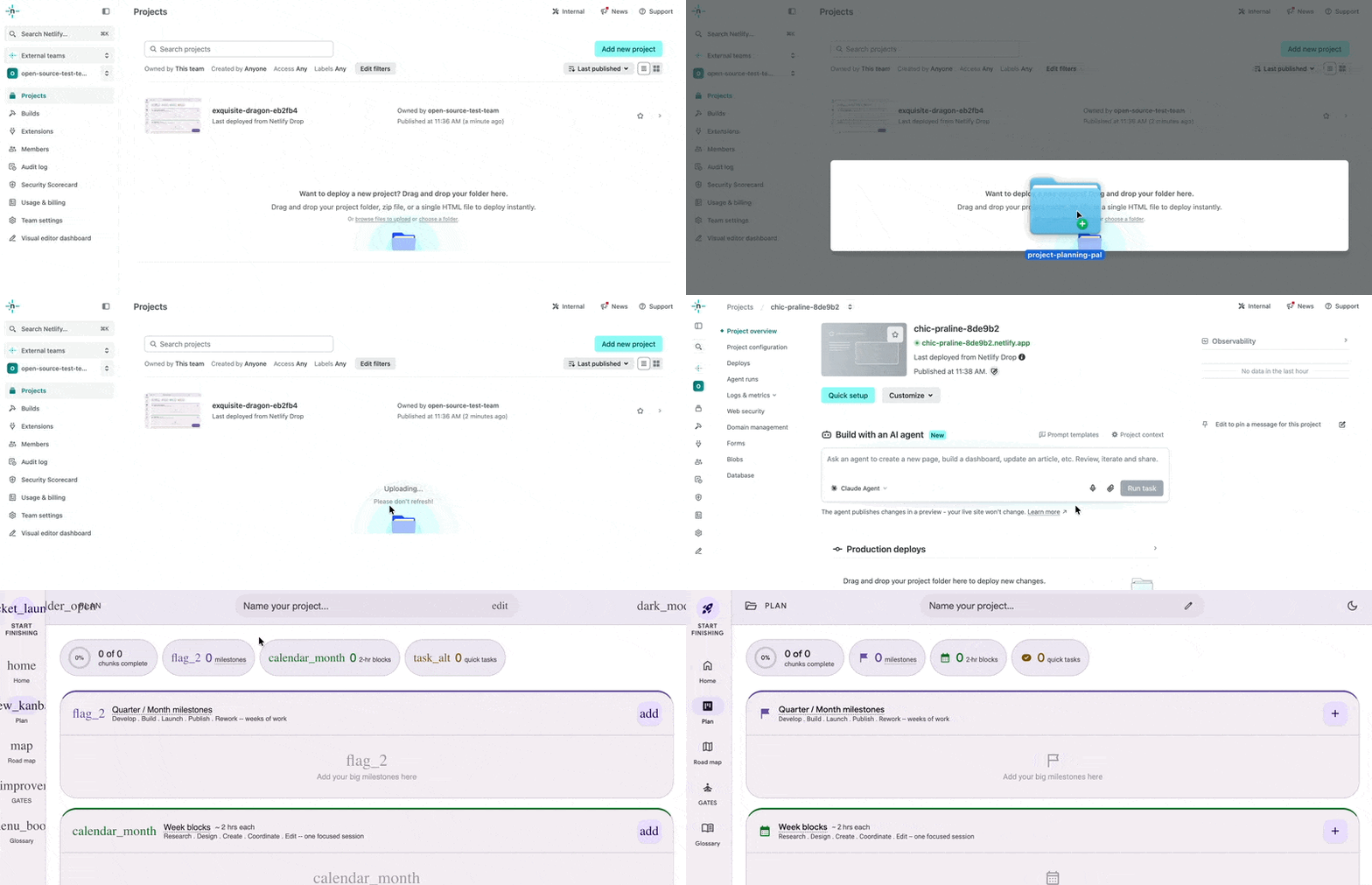
Netlify Drop lets you drag a project folder or ZIP file into the browser and receive a live URL without first connecting a Git repository. You can drop a prepared output folder, or—when signed in—upload a project that still needs a supported build step and let Netlify detect and build it.
It is a useful route for a prototype, a simple static site, or files produced by an AI coding tool. The trade-off is that repeated manual uploads are less traceable than a Git workflow. Netlify’s documentation also notes that dragging an updated folder into a Drop project publishes the update to production, so you should verify the folder locally before using that route.
Deploy Previews, Rollbacks, and Git Workflows

Deploy Previews create a separate version for proposed changes, such as a pull request, before those changes reach the main production URL. That gives you a shareable place to review layout, content, and behavior. Branch deploys serve a similar purpose for ongoing work on a particular branch.
Netlify also retains deploy history, and a previous deploy can be published again as the live version if a release needs to be rolled back. These capabilities make the platform more than an upload destination: they create a reviewable release workflow. Remember that preview URLs may be accessible to anyone with the link unless you configure available protection.
Functions, Forms, Custom Domains, and SSL
Netlify Functions provide server-side code without requiring you to manage a conventional server. They can support tasks such as calling an external API or processing application logic. This is a platform capability rather than a claim about my personal results, and you should check runtime, region, and usage details for your specific architecture.
Netlify Forms can detect supported HTML forms during deployment and collect submissions without a separate form server. Forms still require deliberate setup, spam controls, notifications, and privacy handling. Under the current credit-based plans, Netlify says form submissions are unlimited and free, following its April 2026 pricing update.
You can attach a custom domain, while Netlify provisions and renews HTTPS certificates for supported configurations. HTTPS is available on the current self-service plans. DNS changes and certificate provisioning can take time, so treat domain setup as a configuration task rather than assuming every issue resolves instantly.
Using Netlify with Codex and AI Coding Tools
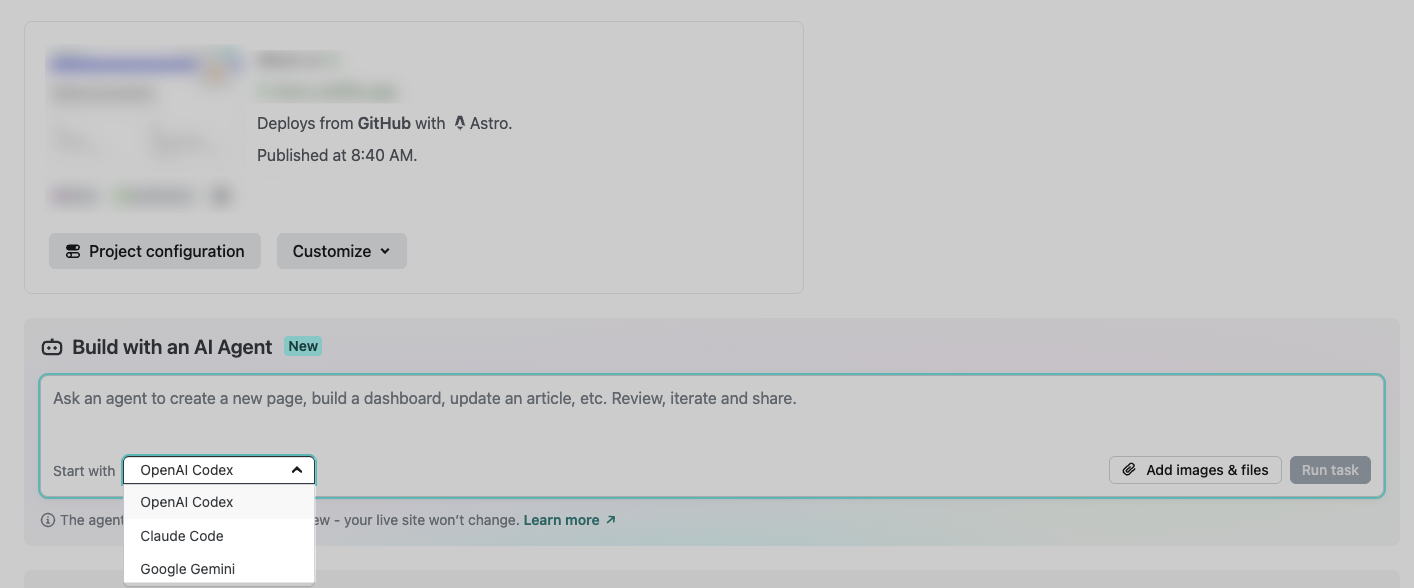
AI coding tools can generate or modify a project locally, but the result still needs a dependable build and deployment path. One practical workflow is to use Codex to work in a repository, review the changes, run the project’s checks, push the branch, and let Netlify create a Deploy Preview. The preview provides a concrete URL for human review before merging.
Netlify has also expanded its own AI workflow. In March 2026, the company announced that builders could start projects from prompts at netlify.new using Agent Runners with supported coding agents, including Codex. Netlify describes this as a route from a prompt to a project on its deployment platform. That is a company product claim, not an independent performance benchmark.
Whichever route you choose, do not treat generated code as automatically production-ready. Review diffs, protect secrets, validate environment variables, test the build, and inspect the preview. AI can shorten the editing loop; the deployment controls remain important.
Netlify Pricing in 2026
Pricing and credit rates were checked against Netlify’s official pricing page and billing documentation on August 1, 2026. Prices and allowances can change, so confirm them before upgrading.
| Plan | Price | Included monthly credits | Important behavior |
|---|---|---|---|
| Free | $0/month | 300 | Hard limit; projects pause after credits run out until the next billing cycle |
| Personal | $9/month | 1,000 | Optional auto recharge; 500 extra credits for $5 |
| Pro | Starts at $20/month | Starts at 3,000 | Optional auto recharge; 1,500 extra credits for $10; higher credit tiers available |
On the current credit-based plans, one production deploy uses 15 credits, bandwidth uses 20 credits per GB, and web requests use 2 credits per 10,000 requests. Compute is metered separately at 10 credits per GB-hour, while AI inference varies by model. Deploy Previews and branch deploys are included without a per-deploy credit charge.
The Free plan cannot auto recharge. When its 300-credit hard limit is reached, projects pause until credits refresh at the next billing cycle. Personal and Pro can use auto recharge, but it is disabled by default, which gives the account owner control over whether additional usage triggers a purchase.
Legacy plans are different. Netlify says existing customers can remain on legacy pricing unless they choose to switch, and the April 2026 credit changes did not rewrite legacy allowances. If your account predates the credit plans, read the billing page for your actual plan instead of applying this table to it.
Netlify Pros and Cons
Pros
- Fast path from a project to a public URL
- Simple Netlify Drop option with no Git repository required
- Git-based continuous deployment and shareable previews
- Deploy history and practical rollback workflow
- Custom domains and SSL across current plans
- Functions, Forms, storage, and other services available as a project grows
Cons
- Credit consumption requires monitoring
- Free projects pause at the hard monthly limit
- Manual Drop updates are less traceable than Git-based releases
- Advanced builds, monorepos, and server-side features still require configuration knowledge
- The range of platform features can feel broad for someone who only needs basic file hosting
Who Is Netlify Best For?
- Beginners and makers who want to publish a static project without managing a server.
- Front-end developers who want builds, previews, and production deploys connected to Git.
- Small teams that benefit from review URLs and reproducible releases.
- AI-assisted builders who need a deployment destination after generating or editing code.
- Projects that may grow into functions, forms, custom domains, or storage without assembling every service immediately.
When Netlify May Not Be the Best Fit
Netlify may be more platform than you need for a tiny site that can live indefinitely on basic static hosting. It may also be the wrong architectural fit when an application depends heavily on a traditional long-running server, a specialized cloud environment, or infrastructure controls that your team already operates elsewhere.
Usage patterns matter too. A high-traffic, bandwidth-heavy project should estimate credit consumption rather than choosing a plan only from its monthly price. Teams on legacy plans must compare their existing terms separately.
Netlify Alternatives
This is a brief orientation rather than a detailed pricing comparison. Vercel is a common choice for front-end applications and is particularly associated with the Next.js ecosystem. Cloudflare Pages is attractive when you want static or full-stack deployment close to Cloudflare’s wider edge platform. GitHub Pages is a simpler option for static content hosted from a repository. Compare current official documentation, framework support, regional needs, and billing for your own workload before deciding.
Frequently Asked Questions
Is Netlify free in 2026?
Yes. The current Free plan costs $0 and has a 300-credit monthly hard limit. If the team exhausts those credits, its projects pause until the next billing cycle.
Do I need Git to use Netlify?
No. Netlify Drop can deploy a local folder or ZIP file without a Git repository. Git becomes valuable when you want automatic builds, versioned changes, and Deploy Previews.
Can Netlify host a custom domain with HTTPS?
Yes. Custom domains with SSL support are included in the current Free, Personal, and Pro plans. Correct DNS configuration is still required.
Can I deploy a project created with Codex?
Yes. You can deploy the generated project through a connected Git repository or upload suitable local files with Netlify Drop. Netlify also lists Codex among the coding agents supported by its own Agent Runners workflow.
Are Netlify Forms and Functions included?
They are available on current credit-based plans. Netlify says form submissions are free and unlimited on these plans as of its April 2026 update, while Functions consume metered compute and may also generate bandwidth or request usage.
Final Verdict
Netlify remains a strong option when you value a smooth route from code to a reviewable, production-ready deployment workflow. My own experience has been very positive, especially because publishing and updating web projects feels straightforward. Netlify Drop lowers the barrier for a first deploy, while Git integration, previews, rollbacks, and platform services provide room to grow.
The decision should still account for architecture and usage. Understand the credit model, monitor consumption, and choose a Git-based workflow when repeatability matters. If those trade-offs fit your project, Netlify is easy to recommend as a practical platform to evaluate.